WAFio Documentation
WAFio is a self-hosted Web Application Firewall and kernel-level security platform. It runs entirely on your infrastructure — no cloud dependency, no data leaves your network.
HTTP L7 WAF + eBPF kernel firewall operate independently but report to the same control plane.
Semantic engine + OWASP CRS run in parallel. Decision latency target is under 5ms p99.
One control plane manages multiple projects. Each project is fully isolated.
1 control plane + 1 WAF agent + 1 host agent. Hardware-bound license, no SaaS fees.
- 1 Control Plane (1 physical/virtual machine)
- 1 WAF Agent (HTTP L7 sidecar proxy)
- 1 Host Agent (eBPF kernel firewall + runtime security)
- License bound to hardware fingerprint — cannot be transferred without re-issuance
Getting Started
The fastest way to deploy WAFio is with the all-in-one installer script. It handles everything: license activation, PostgreSQL setup, binary download, security data, database migrations, admin account, agent provisioning, and systemd services — in a single run.
- 1 Control Plane (WAFio server + web dashboard)
- 1 WAF Agent (HTTP L7 inspection sidecar)
- 1 Host Agent (eBPF kernel firewall + runtime security tracing)
- License bound to hardware fingerprint — perpetual, no subscription
- Requires Linux server with kernel 5.8+ and BTF enabled
Go to wafio.cloud/register and create an account. You can register as an Individual, Business, School, Non-profit, or Freelancer.
After submitting the form, verify your email address with the OTP code sent to your inbox. Once verified, your account is ready.
After logging in, navigate to the License section in your dashboard. Click Generate License. Three license tokens are created — one for each component:
| Component | Description |
|---|---|
controlplane | WAFio control plane server + dashboard |
waf-agent | HTTP L7 WAF inspection sidecar |
host-agent | eBPF kernel firewall + runtime security |
Copy all three tokens — you will enter them during installation.
Each token is permanently bound to the hardware fingerprint of the machine where you run the installer. The license cannot be transferred to another machine without re-issuance. Choose your server carefully.
SSH into your Linux server and run:
curl -fsSL https://releases.wafio.cloud/install.sh | bashThe installer will prompt you for:
- Component selection — choose All Components for a complete setup
- License tokens — paste the three tokens from step 2
- PostgreSQL — whether to install fresh or connect to an existing instance
- Admin account — your name, email, and password for the dashboard
- Project name — a label for your first security project
The installer automatically:
- Activates and hardware-binds all three license tokens
- Installs or configures PostgreSQL + TimescaleDB
- Downloads the latest WAFio binaries from
releases.wafio.cloud - Downloads all security data (GeoIP, OWASP CRS, FireHOL, JA3, Bot signatures)
- Runs all database migrations
- Creates your admin account
- Provisions mTLS certificates for WAF and host agents
- Installs and starts all three components as systemd services
Total installation time: approximately 3–8 minutes depending on your server's internet speed.
When installation completes, the dashboard is available at http://your-server:9087. Log in with the admin credentials you created during installation.
Both agents are already connected and running. Navigate to your project to see them online:
- WAF Agents — your WAF agent is registered and awaiting traffic configuration
- Hosts — your host agent is online and the eBPF firewall is active
- Go to WAF Agents → click your agent → Add Application to configure your upstream app
- Go to Firewall to configure L3/L4 rules for your host
- Go to Runtime Security to review and tune detection rules
Verify Services
After installation, you can verify all three services are running:
sudo systemctl status wafio wafio-waf-agent wafio-host-agent

# View live logs
sudo journalctl -u wafio -f
sudo journalctl -u wafio-waf-agent -f
sudo journalctl -u wafio-host-agent -f
PostgreSQL Already Installed?
If your server already has PostgreSQL running, the installer asks for your connection details. It will create a dedicated wafio database and role — your existing databases are not touched.
Required: PostgreSQL 14+ with the TimescaleDB extension. The installer enables it automatically if TimescaleDB is installed but the extension is not yet active in the wafio database.
Fresh PostgreSQL Install
If no PostgreSQL is detected, the installer installs the latest PostgreSQL and TimescaleDB packages for your distro (Ubuntu/Debian via apt, RHEL/Rocky/CentOS via dnf/yum), then creates the wafio database automatically.
Architecture
WAFio uses a hub-and-spoke architecture. The Control Plane is the central brain — it stores configuration, aggregates telemetry, and pushes rule updates to agents over a gRPC mTLS channel.
Component Roles
| Component | Role | Port |
|---|---|---|
wafio (control plane) | Dashboard, REST API, agent orchestration, telemetry storage | HTTP :9087, gRPC :9090 |
wafio-waf-agent | HTTP reverse proxy sidecar — inspects every request before it reaches your app | Configurable (e.g. :8080) |
wafio-host-agent | Linux-only eBPF kernel agent — L3/L4 firewall + runtime security tracing | N/A (kernel space) |
How Agents Connect
Agents connect to the control plane over gRPC using mutual TLS (mTLS). Each agent presents a client certificate provisioned from the Credentials page. The certificate's SHA-256 fingerprint identifies which project the agent belongs to — no additional API key needed.
On connect, the control plane pushes a bundle containing the full WAF configuration. The agent applies this configuration and begins inspecting traffic. Any subsequent configuration change is pushed automatically without restarting the agent.
Security Data Setup
WAFio requires external threat intelligence data — GeoIP databases, OWASP CRS rules, IP reputation lists, JA3 fingerprints, and bot signatures. This data is not bundled in the binary and must be downloaded separately.
When you install WAFio using install.sh, security data is downloaded automatically as part of the installation. You do not need to run fetch-data manually after using the installer. This section is relevant only if you need to refresh data or used a manual install.
If the security data directory is missing or incomplete, WAFio will start but GeoIP blocking, bot protection, JA3 filtering, CRS detection, and Firehol IP reputation will be non-functional.
Download Everything (Recommended)
Run this single command from the directory where the wafio binary lives:
# Download all security data (no MaxMind account required)
./wafio fetch-data

# Output example:
# ── GeoIP country  ✓  (DB-IP free, 2026-05)
# ── GeoIP city     ✓  (DB-IP free, 2026-05)
# ── GeoIP ASN      ✓  (DB-IP free, 2026-05)
# ── OWASP CRS      ✓  v4.9.0 (147 rule files)
# ── FireHOL L1     ✓  (812,291 entries)
# ── FireHOL L2     ✓  (additional 1.4M entries)
# ── JA3 blacklist  ✓  (Salesforce + abuse.ch)
# ── Bot UA list    ✓  (nginx bad-bot-blocker)
# ✅  All security data fetched successfully (34s)
What Gets Downloaded
| Component | Files | Used for |
|---|---|---|
geoip | security-data/geoip/country.mmdbcity.mmdb, asn.mmdb | GeoIP country blocking, dashboard geo map, IP enrichment |
crs | security-data/crs/coreruleset/ | OWASP Core Rule Set v4 — WAF detection rules (Coraza engine) |
firehol | security-data/firehol/firehol_level1.netsetfirehol_level2.netset | IP reputation blocklists (known malicious IPs, botnets, scanners) |
ja3 | security-data/ja3/ja3.txt | JA3 TLS fingerprint blacklist (malware C2, exploit kits) |
ua | security-data/user-agents/bot.txt | Bad bot user-agent strings (scrapers, attack tools) |
GeoIP Provider: DB-IP vs MaxMind
By default, WAFio downloads from DB-IP — a free GeoIP provider with no account or license key required. If you need MaxMind GeoLite2 (slightly more accurate), obtain a free license key at maxmind.com/en/geolite2/signup and set it in config:
geo:
  maxmind_license_key: "YOUR_FREE_LICENSE_KEY_HERE"
Then re-run ./wafio fetch-data --force to download MaxMind databases.
Profile Shortcuts
Use --profile to download only the components a specific binary needs:
| Profile | Components | Use when |
|---|---|---|
--profile all | Everything | Default — recommended for first install |
--profile control-plane | geoip (all), ja3, ua | Control plane host only (no WAF/host agent) |
--profile agent | geoip, crs, firehol, ja3, ua | WAF agent machine (no control plane) |
Useful Options
# Update only GeoIP databases (e.g. monthly refresh)
./wafio fetch-data --only geoip

# Force re-download everything (overwrite existing files)
./wafio fetch-data --force

# Download a specific CRS version
./wafio fetch-data --crs-version v4.9.0

# Use MaxMind key from CLI (overrides config)
./wafio fetch-data --maxmind-key YOUR_KEY_HERE
Keeping Data Fresh
GeoIP databases are updated monthly by DB-IP/MaxMind. FireHOL and JA3 lists update daily. We recommend adding a monthly cron job:
# /etc/cron.d/wafio-update-security-data
0 3 1 * * root /opt/wafio/wafio fetch-data --profile all >> /var/log/wafio/fetch-data.log 2>&1Setup Wizard (Manual Install)
If you installed WAFio using the install.sh script (recommended), the Setup Wizard was already completed automatically during installation. This section is only relevant for advanced users who installed WAFio manually (e.g., unpacking binaries by hand, Docker, or CI environments).
On first launch of a manually installed control plane, WAFio shows a 3-step Setup Wizard at http://your-server:9087. This wizard configures the control plane, runs database migrations, and creates your first admin account.
The wizard is safe to interrupt — if you close the browser, it will resume from the last completed step when you return. Once all three steps are complete, the wizard never appears again.
Fill in the connection details for your infrastructure. All fields have sensible defaults pre-filled — the minimum you need to change are:
| Field | What to set |
|---|---|
| PostgreSQL host / port / name / user / password | Your PostgreSQL instance credentials |
| JWT Secret | Any long random string (e.g. openssl rand -hex 32). Required in production. |
| SMTP host / user / password | Your SMTP server for email (OTP, alerts). Can be skipped if email is not needed. |
| Environment | Set to production for live deployments. Enables security headers and JWT validation. |
| GeoIP / Bot UA / JA3 paths | Pre-filled to match wafio fetch-data output paths — do not change unless you moved files. |
Click Save & Validate to test database connectivity and proceed to Step 2.
This step applies all pending database migrations to your PostgreSQL instance. WAFio uses golang-migrate with numbered migration files.
The wizard shows a live progress indicator as each migration runs. If a migration fails, the error is shown with enough context to diagnose the issue (usually a permissions or extension problem).
- Migration fails with "permission denied" — ensure the DB user has
CREATE TABLEprivileges - Migration fails with "extension does not exist" — some migrations require
uuid-ossp:CREATE EXTENSION IF NOT EXISTS "uuid-ossp"
Once all migrations succeed, click Continue to Admin Setup.
Create the first admin user. This account gets the system role: admin — it can access all projects, manage members, and reach the /admin API endpoints.
| Field | Notes |
|---|---|
| Name | Display name shown in the dashboard |
| Used for login and notifications | |
| Password | Minimum 12 characters. The strength meter updates live. |
Click Complete Setup. The wizard marks itself as done and redirects you to /login. Log in with the admin credentials you just set.
After the Wizard
- Log in with your admin credentials at
http://your-server:9087/login - Click New Project to create your first security project
- Go to Credentials and provision an mTLS certificate for each agent
- Deploy WAF and/or Host agents using the certificates (see WAF Agent Setup)
Quick Start (Manual)
This section describes manual installation by unpacking binaries and configuring services by hand. If you are deploying for the first time, use Getting Started above — the install.sh script handles everything automatically.
This guide walks you through deploying WAFio manually — control plane first, then agents.
Prerequisites
- Linux server (Ubuntu 22.04+ or Debian 11+ recommended)
- Docker + Docker Compose (for PostgreSQL + Manticore Search)
- A valid WAFio license key (obtain free from wafio.cloud)
- Ports 9087 (HTTP) and 9090 (gRPC) open in your firewall
Start Dependencies
WAFio requires PostgreSQL for its database and Manticore Search for the WAF event log.
docker compose up -d db manticoreConfigure the Control Plane
Copy the example config and fill in required values:
cp config/config.example.yaml config/config.yamlMinimum required settings:
server:
  http_addr: ":9087"
  env: production

database:
  host: localhost
  port: 5432
  name: wafio
  user: wafio
  password: your-db-password

jwt:
  secret: "your-32-char-secret-here"

logs:
manticore_index: waf_eventsRun the Control Plane
# Run migrations + start server
./wafio serve --migrate

# Or run in background
nohup ./wafio serve --migrate > wafio-server.log 2>&1 &
The control plane runs the Setup Wizard on first launch. Open http://your-server:9087 and complete it to create your admin account and first project.
Create a Project
After setup, log in and click New Project. Give it a name (e.g. "Production"). Each project groups agents and their configuration together.
Provision Credentials
Go to Credentials in your project sidebar. Enter a name for the credential (e.g. edge-waf-prod) and click Provision. Download the credential bundle immediately — the private key is shown only once.
The bundle contains: ca.crt, client.crt, client.key. Store securely on the agent machine.
Deploy WAF Agent
# Copy binary + certs to agent machine
scp wafio-waf-agent user@agent-server:/usr/local/bin/
scp ca.crt client.crt client.key user@agent-server:/etc/wafio/certs/

# Start the agent
WAFIO_GRPC_SERVER=your-control-plane:9090 \
WAFIO_CA_CERT=/etc/wafio/certs/ca.crt \
WAFIO_CLIENT_CERT=/etc/wafio/certs/client.crt \
WAFIO_CLIENT_KEY=/etc/wafio/certs/client.key \
WAFIO_AGENT_NAME=edge-waf-prod \
WAFIO_LISTEN_ADDR=:8080 \
WAFIO_UPSTREAM=http://localhost:3000 \
./wafio-waf-agent
The agent will connect to the control plane, receive its configuration bundle, and begin proxying traffic on port 8080 to your upstream application on port 3000.
Verify
In the dashboard, navigate to WAF Agents. Your agent should appear with status ONLINE. Send a test request with a SQL injection payload to confirm blocking is working:
curl "http://your-agent:8080/?id=1' OR '1'='1"
# Expected: 403 Forbidden (if blocking mode is enabled)Dashboard Tour
The WAFio dashboard gives you a real-time view of your infrastructure's security posture. Here is a walkthrough of every section.
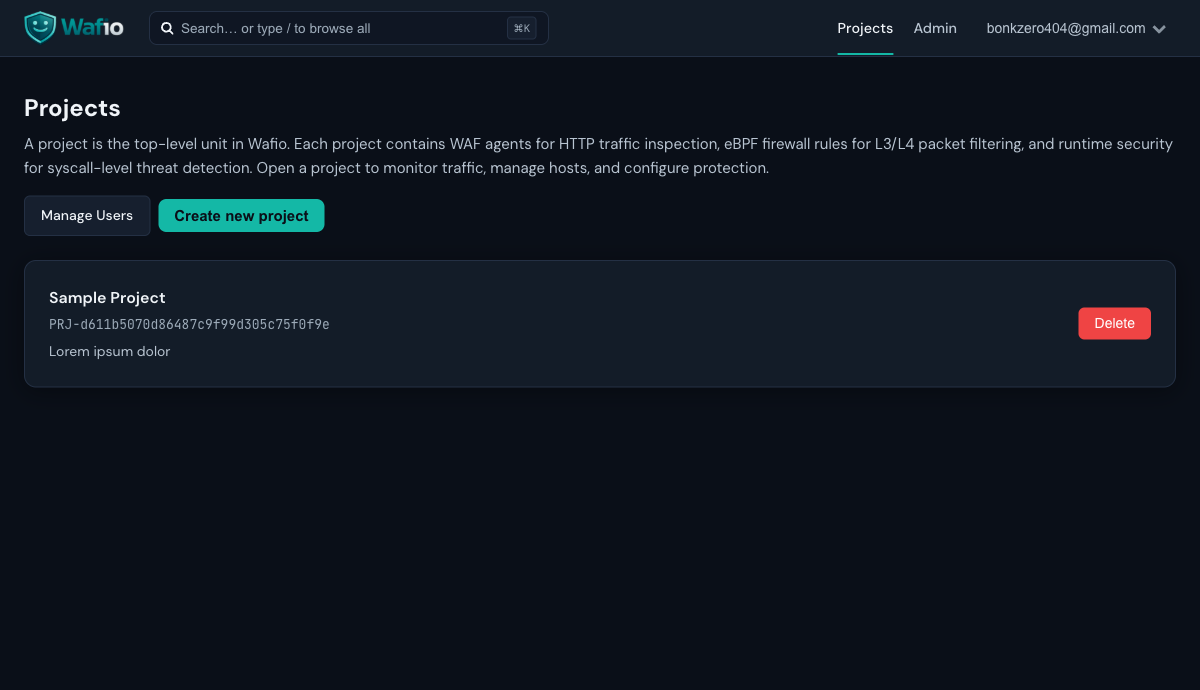
Projects List
The projects list is your starting point. Each project represents an isolated security environment — with its own agents, credentials, WAF rules, and event log.
Project Overview
The Overview page shows the health of all four protection layers at a glance: WAF Agents, Firewall, Runtime Security, and Hosts. Key metrics include the Security Score gauge, WAF latency SLA, total blocked requests, and critical events count.
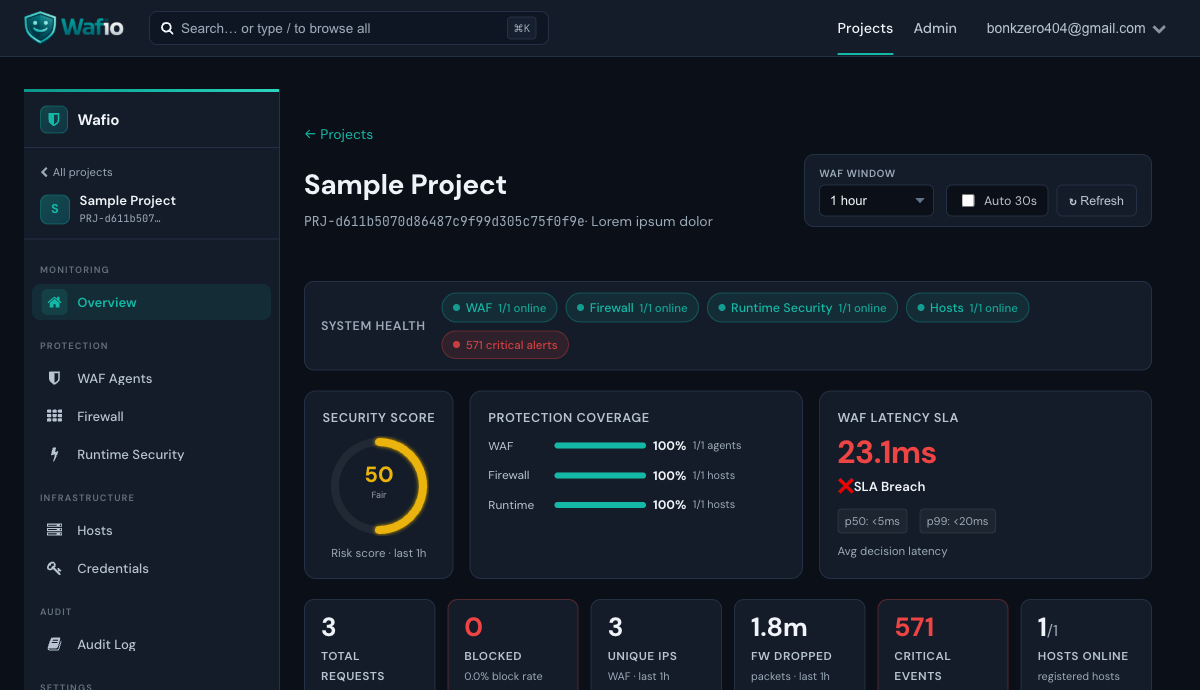
A 0–100 composite score based on agent health, event severity distribution, and SLA compliance. Aim for 80+.
Target is under 20ms p99. If the WAF agent adds more than 20ms per request, the SLA indicator turns red.
Shows the percentage of your traffic surface covered by each protection layer.
Count of BLOCK-level decisions in the current window. Drill down in the WAF event log.
WAF Agents
The WAF Agents page lists all registered agents for this project. Each agent card shows its online status, how many applications it is protecting, and when it last connected.
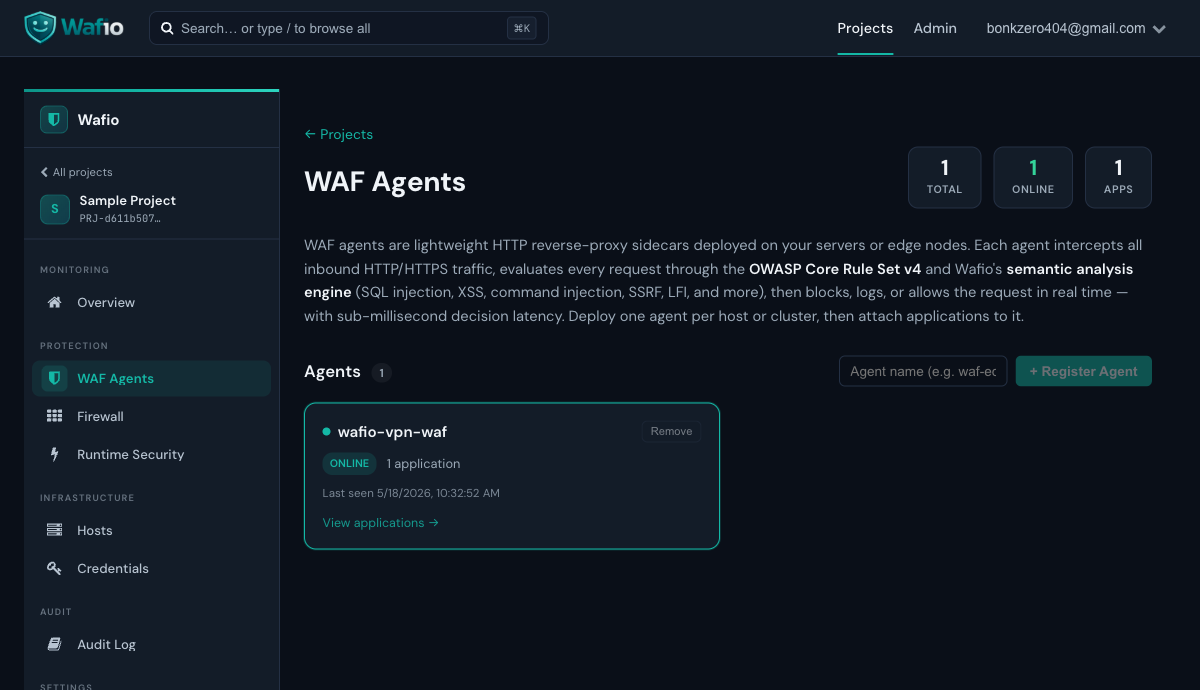
Click View applications → on an agent card to see the upstream apps protected by that agent, and to configure per-app WAF rules (sensitivity level, block threshold, custom exclusions).
Firewall
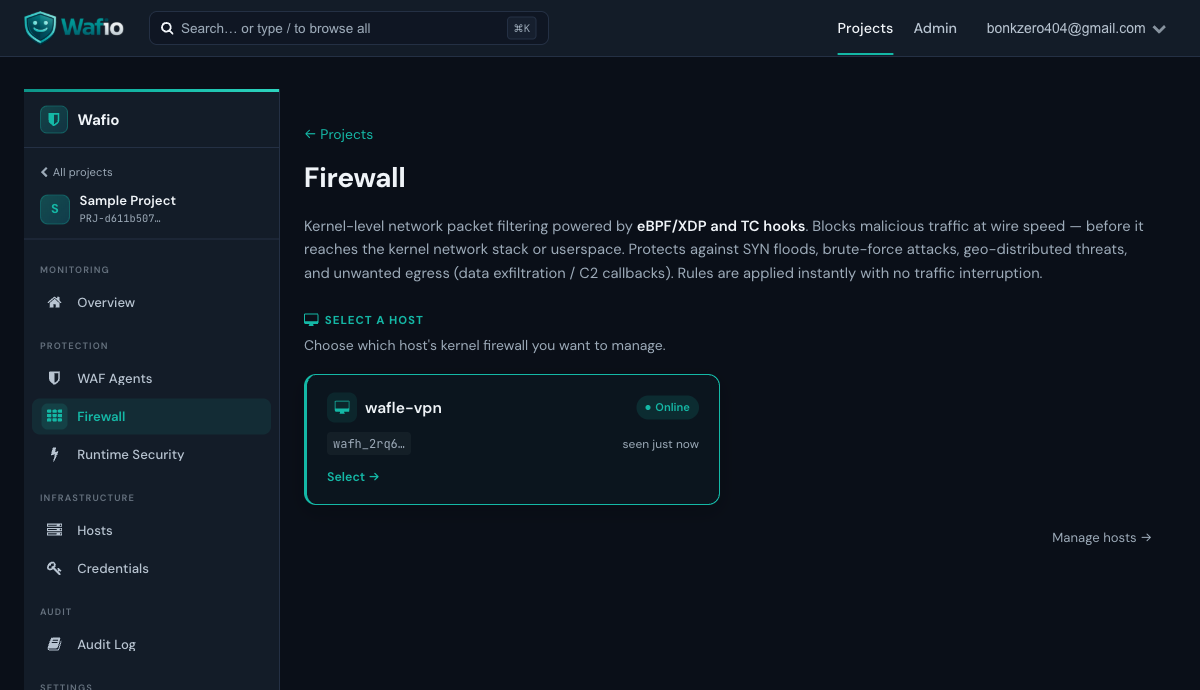
The Firewall page manages the eBPF kernel firewall on each host. Select a host to configure inbound/outbound rules, IP blocklists, country blocking, and SYN flood protection. Rules are applied instantly via BPF maps — no iptables, no service restart.
Runtime Security
Runtime Security uses eBPF tracepoints to monitor process execution, file access, network connections, and privilege escalation — all at the kernel level, with zero application instrumentation.
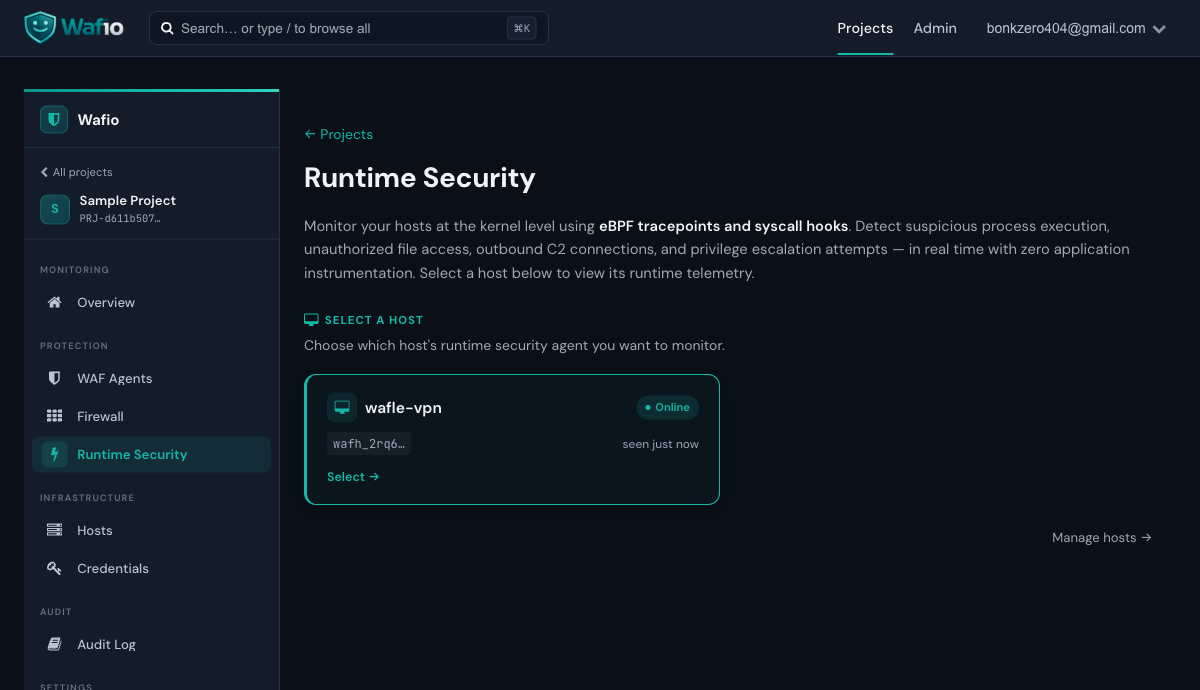
Select a host to view its live event stream. Events are categorized by severity (INFO, LOW, MEDIUM, HIGH, CRITICAL). Detection rules are Falco-compatible — you can write conditions on process name, parent process, filename, network address, UID, and more.
Hosts
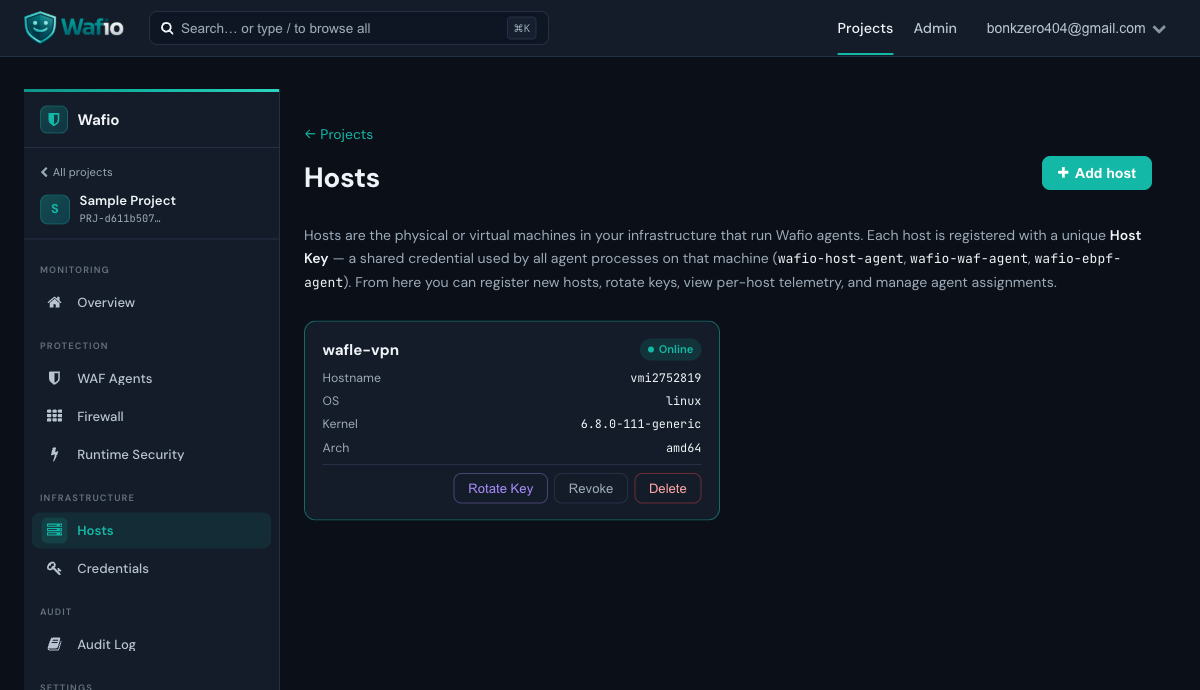
The Hosts page lists all machines running the WAFio host agent. Each host entry shows its online status, hardware fingerprint, registered host key, and the last time it was seen. This is also where you register new hosts before deploying the host agent.
Credentials
Credentials provisions mTLS client certificates for agents. Each certificate is signed by the project's internal CA. The private key is shown once at provisioning time — download and store it securely.
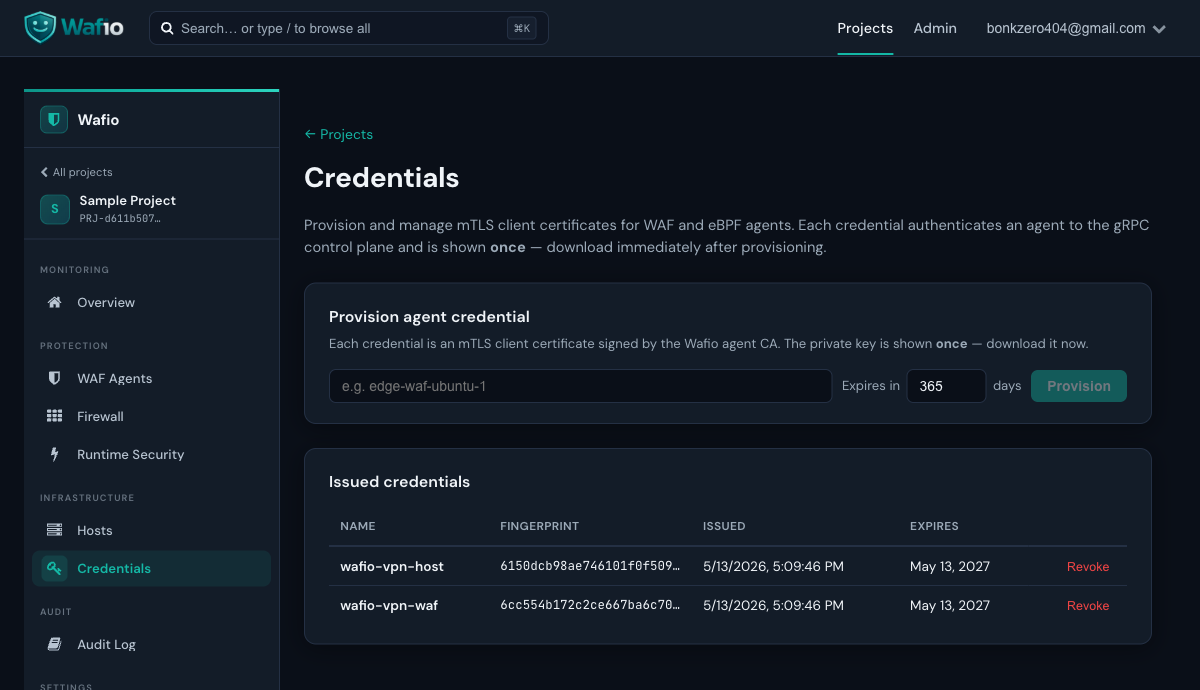
The private key (client.key) is never stored on the control plane. If you lose it, revoke the credential and provision a new one. Credentials can be revoked at any time — the agent will disconnect within seconds.
Audit Log
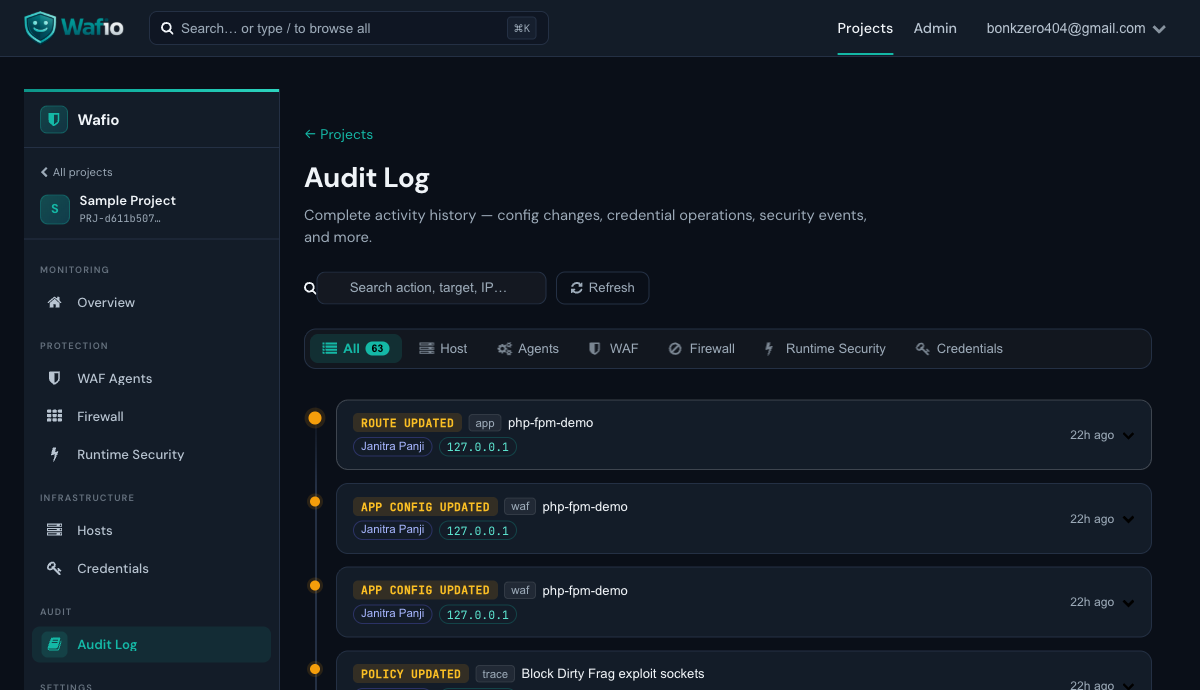
The Audit Log records every action taken by project members: logins, configuration changes, credential provisioning, agent registration, and WAF rule changes. Use it for compliance, incident investigation, and change tracking.
WAF Agent Setup
The WAF agent is a lightweight HTTP reverse-proxy sidecar. Deploy it in front of any HTTP/HTTPS application. It intercepts every request, runs it through the detection pipeline, and either forwards, logs, or blocks it.
How It Works
Systemd Service
For production deployment, install the agent as a systemd service:
[Unit]
Description=WAFio WAF Agent
After=network.target

[Service]
Type=notify
ExecStart=/usr/local/bin/wafio-waf-agent
ExecReload=/bin/kill -USR2 $MAINPID
Restart=on-failure
RestartSec=5s
Environment=WAFIO_GRPC_SERVER=10.1.1.2:9090
Environment=WAFIO_CA_CERT=/etc/wafio/certs/ca.crt
Environment=WAFIO_CLIENT_CERT=/etc/wafio/certs/client.crt
Environment=WAFIO_CLIENT_KEY=/etc/wafio/certs/client.key
Environment=WAFIO_AGENT_NAME=waf-prod-01
Environment=WAFIO_LISTEN_ADDR=:8080
Environment=WAFIO_UPSTREAM=http://localhost:3000

[Install]
WantedBy=multi-user.target
systemctl daemon-reload
systemctl enable --now wafio-waf-agent
systemctl status wafio-waf-agentZero-Downtime Reload
The WAF agent supports graceful restarts via tableflip. Send SIGUSR2 (or systemctl reload wafio-waf-agent) to perform a zero-downtime restart — the new process inherits all listening sockets before the old one drains and exits.
Key Environment Variables
| Variable | Required | Description |
|---|---|---|
WAFIO_GRPC_SERVER | Yes | Control plane gRPC address (e.g. 10.1.1.2:9090) |
WAFIO_CA_CERT | Yes | Path to CA certificate |
WAFIO_CLIENT_CERT | Yes | Path to agent client certificate |
WAFIO_CLIENT_KEY | Yes | Path to agent private key |
WAFIO_AGENT_NAME | Yes | Must match the name used when provisioning the credential |
WAFIO_LISTEN_ADDR | Yes | Address/port the WAF agent listens on (e.g. :8080) |
WAFIO_UPSTREAM | Yes | Upstream application URL (e.g. http://localhost:3000) |
WAFIO_GRPC_SERVER_NAME | No | Override TLS SNI (useful when connecting via IP: set to 127.0.0.1) |
Host Agent Setup
The host agent runs on Linux and provides two capabilities: a kernel-level eBPF firewall (XDP/TC) and runtime security tracing (syscall/tracepoint hooks). It requires root privileges and a Linux kernel 5.8+ with BTF enabled.
- Linux kernel 5.8+ with BTF (
CONFIG_DEBUG_INFO_BTF=y) - Root privileges (systemd service runs as root)
- Verify BTF:
ls /sys/kernel/btf/vmlinux— file must exist - eBPF objects are pre-compiled (CO-RE) — no kernel headers needed at deploy time
Register a Host
Before deploying the agent, register the host in the dashboard:
- Go to Hosts in your project sidebar
- Click Register Host
- Enter a name and optionally a description
- Copy the generated host key — you will pass this to the agent
Systemd Service
[Unit]
Description=WAFio Host Agent
After=network.target

[Service]
Type=simple
ExecStart=/usr/local/bin/wafio-host-agent
Restart=on-failure
RestartSec=5s
Environment=WAFIO_GRPC_SERVER=10.1.1.2:9090
Environment=WAFIO_CA_CERT=/etc/wafio/certs/ca.crt
Environment=WAFIO_CLIENT_CERT=/etc/wafio/certs/client.crt
Environment=WAFIO_CLIENT_KEY=/etc/wafio/certs/client.key
Environment=WAFIO_HOST_KEY=your-host-key-here

[Install]
WantedBy=multi-user.target
What the Host Agent Monitors
Every execve with full command line, parent/grandparent, UID, cgroup, and container context.
Opens to sensitive paths (/etc/passwd, /proc/, web shells) with read/write flags.
Outbound TCP connections — useful to detect C2 callbacks, reverse shells, and data exfiltration.
setuid/setgid, capability grants, and container namespace escapes detected at syscall level.
Credentials (mTLS)
Every agent authenticates to the control plane using a mutual TLS client certificate. WAFio uses its own internal CA per project — no public CA is involved.
Provisioning a Credential
- Navigate to Credentials in your project
- Enter a descriptive name (e.g.
waf-prod-edgeorhost-vpn-server) - Set expiry in days (default: 365)
- Click Provision
- The modal shows the one-time credential bundle — copy or download it immediately
Credential Bundle Contents
| File | Description |
|---|---|
ca.crt | Project CA certificate — used by the agent to verify the control plane's identity |
client.crt | Agent's client certificate — shown to the control plane during TLS handshake |
client.key | Agent's private key — shown once, never stored on the server |
Revoking a Credential
Click Revoke next to any issued credential. The agent will lose its connection within seconds. Revocation is immediate and permanent — provision a new credential if you need to reconnect the agent.
Firewall
The WAFio firewall operates at the kernel level using eBPF XDP and TC hooks. It processes packets before they reach the kernel's network stack — orders of magnitude faster than iptables or nftables.
Firewall Rule Types
| Rule Type | Description |
|---|---|
| IP Blocklist | Drop all traffic from specific IP addresses or CIDR ranges |
| IP Allowlist | Only allow traffic from whitelisted IPs (default-deny mode) |
| Country Block | GeoIP-based blocking — drop all traffic from specified country codes |
| Port Rules | Block or allow specific TCP/UDP ports |
| SYN Flood Protection | Rate-limit new TCP connections per source IP |
| Egress Control | Block outbound connections to specific IPs/ports (C2 callback prevention) |
Rule Application
Rules are pushed to the agent as BPF map updates — they take effect instantly with no traffic interruption. The agent does not need to be restarted. Changes are reflected in the dashboard within 1–2 seconds.
Runtime Security
Runtime security uses eBPF tracepoints to hook into kernel syscalls — detecting suspicious behavior at the source rather than relying on log-based detection after the fact.
Detection Rules
WAFio ships with built-in detection rules seeded at project creation. Each rule has ordered conditions (all AND-ed) and an action:
| Action | Effect |
|---|---|
suppress | Drop the event — reduce noise from known-good processes |
escalate | Raise event severity — force attention to high-value events |
downgrade | Lower severity — tune noisy rules without disabling them |
tag | Add a label to the event — useful for SIEM correlation |
Condition Fields
Rules can match on: comm, parent_comm, grandparent_comm, event_name, category, severity, filename, addr, port, uid, gid, is_container, container_image.
Supported operators: eq, neq, in, not_in, contains, starts_with, glob, gte, lte.
Example: Suppress Noisy Docker Events
# Suppress all events from the 'containerd-shim' process
conditions:
  - field: comm
    op: eq
    value: containerd-shim
action: suppressDetection Engine
WAFio's detection pipeline runs two independent analysis layers on every HTTP request. Both results are combined by the Decision Engine to produce a final verdict.
Layer 1: Semantic Engine
Eight AST/parser-based analyzers run in parallel — each specialized for a specific attack category:
| Analyzer | Detects |
|---|---|
| SQL | SQL injection via full SQL AST parsing — detects UNION, subqueries, boolean blinds |
| XSS | Cross-site scripting — HTML/JS parser with event handler and script tag analysis |
| CMD | OS command injection — shell metacharacter and command-chaining detection |
| LFI | Local file inclusion — path traversal patterns (../, null bytes, encoded variants) |
| SSRF | Server-side request forgery — RFC-1918 targets, cloud metadata endpoints |
| Java | Java deserialization, SpEL/OGNL injection, Log4Shell payloads |
| PHP | PHP code injection, wrapper abuse (php://, data://) |
| Python | Python template injection, __class__.__mro__ gadget chains |
Layer 2: OWASP CRS v4
Coraza runs OWASP Core Rule Set v4 in DetectionOnly mode — it never blocks directly. Matched rule IDs are fed into the Decision Engine.
Decision Engine
For each matched CRS rule, the Decision Engine looks up its RuleMeta: attack category, base score, sensitivity level, and confidence multiplier. Rules above the project's sensitivity threshold are silently dropped. The remaining scores are summed:
total_score = Σ (base_score × confidence) for each matched rule

if total_score >= block_threshold  → BLOCK
if total_score >= log_threshold    → LOG
else                               → ALLOW
Sensitivity Levels
| Level | Value | Use Case |
|---|---|---|
| Safe | 1 | Aggressive blocking — lowest false-positive tolerance. Good for APIs. |
| Balanced | 2 | Default. Good balance for most web applications. |
| Aggressive | 3 | High sensitivity — more detections, more potential false positives. |
Tuning False Positives
- Lower the project sensitivity level (Safe → Balanced)
- Raise the
block_thresholdin project WAF config - Add path exceptions for known-safe routes (health checks, webhooks)
- Enable
skip_coraza_when_semantic_clean: true(default) to suppress CRS results when the semantic engine finds nothing
Configuration Reference
Configuration is loaded in priority order: config/config.yaml → WAFIO_* environment variables → CLI flags.
Every YAML key maps to an environment variable: server.http_addr → WAFIO_SERVER_HTTP_ADDR.
Required Settings
| Key | Env Var | Description |
|---|---|---|
database.name | WAFIO_DATABASE_NAME | PostgreSQL database name — server refuses to start if empty |
logs.manticore_index | WAFIO_LOGS_MANTICORE_INDEX | Manticore Search index name for WAF events |
jwt.secret | WAFIO_JWT_SECRET | Must be changed from default in env: production |
Common Settings
server:
  http_addr: ":9087"          # HTTP listen address
  grpc_addr: ":9090"          # gRPC listen address for agents
  env: production             # "development" or "production"

database:
  host: localhost
  port: 5432
  name: wafio
  user: wafio
  password: secret
  max_conns: 20

jwt:
  secret: "change-me-in-production"
  expiry_hours: 24

logs:
  manticore_addr: "127.0.0.1:9306"
  manticore_index: waf_events

smtp:
  host: smtp.example.com
  port: 587
  user: noreply@example.com
  password: smtp-password

crs:
  path: "./security-data/crs"   # path to OWASP CRS rules
WAF Project Config (per-project JSON)
Each project stores its WAF configuration as a JSON blob. These settings control blocking behavior for that project:
{"block_threshold": 5.0,
  "log_threshold": 2.0,
  "sensitivity": 2,
  "skip_coraza_when_semantic_clean": true,
  "geo_block_countries": [],
  "bot_protection": true,
  "rate_limit_rps": 100
}License & Hardware Binding
WAFio uses a hardware-bound license model. Your license key is tied to the machine where the control plane runs — it cannot be used on a different machine without re-issuance.
Obtaining a License
- Register at wafio.cloud
- Log in to your portal account
- Navigate to the dashboard and click Generate License Key
- The portal will issue a license key for your account
Activating a License
# Activate license on the control plane machine
./wafio license activate --key LICENSE-XXXX-XXXX-XXXX

# Verify activation
./wafio license status
Hardware Binding
When the control plane starts with a license key, it computes a hardware fingerprint from the machine's CPU, motherboard, and network interface identifiers. This fingerprint is recorded on the licensing server. If the fingerprint changes (e.g. machine migration), the license enters a grace period of 72 hours — contact support for re-issuance.
Free Tier Entitlements
| Component | Free Tier |
|---|---|
| Control Plane | 1 machine |
| WAF Agents | 1 agent |
| Host Agents | 1 agent |
| Projects | Unlimited |
| WAF Event Retention | 7 days |
| Support | Community (GitHub Issues) |